Error message
- Deprecated function: Return type of DatabaseStatementBase::execute($args = [], $options = []) should either be compatible with PDOStatement::execute(?array $params = null): bool, or the #[\ReturnTypeWillChange] attribute should be used to temporarily suppress the notice in require_once() (line 2244 of /home/venture/public_html/includes/database/database.inc).
- Deprecated function: Return type of DatabaseStatementEmpty::current() should either be compatible with Iterator::current(): mixed, or the #[\ReturnTypeWillChange] attribute should be used to temporarily suppress the notice in require_once() (line 2346 of /home/venture/public_html/includes/database/database.inc).
- Deprecated function: Return type of DatabaseStatementEmpty::next() should either be compatible with Iterator::next(): void, or the #[\ReturnTypeWillChange] attribute should be used to temporarily suppress the notice in require_once() (line 2346 of /home/venture/public_html/includes/database/database.inc).
- Deprecated function: Return type of DatabaseStatementEmpty::key() should either be compatible with Iterator::key(): mixed, or the #[\ReturnTypeWillChange] attribute should be used to temporarily suppress the notice in require_once() (line 2346 of /home/venture/public_html/includes/database/database.inc).
- Deprecated function: Return type of DatabaseStatementEmpty::valid() should either be compatible with Iterator::valid(): bool, or the #[\ReturnTypeWillChange] attribute should be used to temporarily suppress the notice in require_once() (line 2346 of /home/venture/public_html/includes/database/database.inc).
- Deprecated function: Return type of DatabaseStatementEmpty::rewind() should either be compatible with Iterator::rewind(): void, or the #[\ReturnTypeWillChange] attribute should be used to temporarily suppress the notice in require_once() (line 2346 of /home/venture/public_html/includes/database/database.inc).
- Deprecated function: Return type of DatabaseCondition::count() should either be compatible with Countable::count(): int, or the #[\ReturnTypeWillChange] attribute should be used to temporarily suppress the notice in require_once() (line 1652 of /home/venture/public_html/includes/database/query.inc).
- Deprecated function: Creation of dynamic property MergeQuery::$condition is deprecated in MergeQuery->__construct() (line 1344 of /home/venture/public_html/includes/database/query.inc).
- Deprecated function: Creation of dynamic property DatabaseCondition::$stringVersion is deprecated in DatabaseCondition->compile() (line 1865 of /home/venture/public_html/includes/database/query.inc).
- Deprecated function: Creation of dynamic property DatabaseCondition::$stringVersion is deprecated in DatabaseCondition->compile() (line 1865 of /home/venture/public_html/includes/database/query.inc).
- Deprecated function: Creation of dynamic property DatabaseCondition::$stringVersion is deprecated in DatabaseCondition->compile() (line 1865 of /home/venture/public_html/includes/database/query.inc).
- Deprecated function: Creation of dynamic property DatabaseCondition::$stringVersion is deprecated in DatabaseCondition->compile() (line 1865 of /home/venture/public_html/includes/database/query.inc).
Menus
The menu admin page can be found under the "Site Building" admin area.
When you go to the page for configuring your menus, you will see a listing of the menus available plus tabs for creating new menus and the settings for the menu.
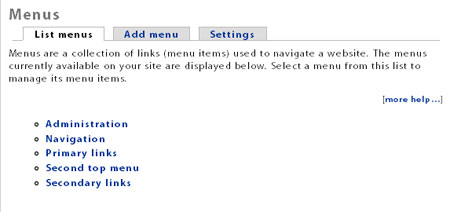
Sites typically come standard with these menus: Navigation, Primary links, and Secondary links.
Navigation is the menu that shows in the sidebar and is titled by your username. Read about the Nav menu here.
Primary links is the menu most often used in the banner area.
Secondary links can either be a completely different menu or you can assign to it the same items as the Primary links menu. This allows you to show child items of the Primary links. You can read more about this on Drupal.org (opens in a new window).
You can edit and add to your menu system from here:
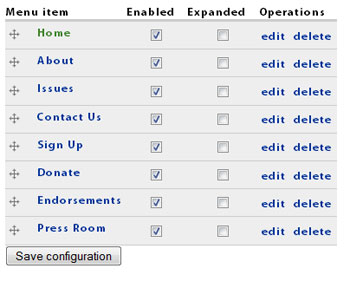
As you can see, you can easily disable or rearrange items for any menu.
Zircon - This is a contributing Drupal Theme
Design by
WeebPal.